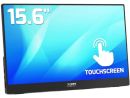
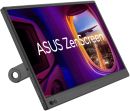
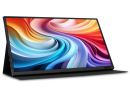
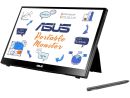
Overview:ZenScreen Ink MB14AHDASUS ZenScreen Ink MB14AHD portable monitor - 14-inch FHD (1920 x 1080), IPS, 10-point touch, Stylus Pen, USB Type-C, Micro HDMI, ergo kickstand, tripod socket, ASUS Flicker Free and Low Blue Light technologies
- 14-inch FHD (1920 x 1080) IPS portable monitor with 10-point touch and active stylus support
- MPP 2.0 stylus with 4096-level pressure sensitivity and low latency for precise and exceptional writing experiences
- Rich connectivity with two USB-C (DP Alt mode) and micro HDMI
- Integrated stepless kickstand offers up to 150° of hinge movement in both landscape and portrait orientation to suit different scenarios
- Built-in ¼"-threaded socket for compatibility with a standard tripod
Features:Productivity at the tip of your stylus ASUS ZenScreen Ink MB14AHD is a 14-inch IPS FHD portable monitor with 10-point touch functionality and ASUS Pen (SA201H)* that allows users to write, draw anytime and anywhere. The included ASUS Pen features MPP 2.0 and 4096 pressure level for precise and lag-free writing and drawing experiences. It even features an integrated stepless kickstand, enabling ZenScreen Ink to be used in almost any position.
*10-point touch and stylus only works in Windows
The ultimate portable touchscreen and pen combination With the MPP 2.0-compliant ASUS Pen, 10-point touch functionality and portable design, ZenScreen Ink is the perfect companion for taking notes, drawing or even signing documents - anywhere, anytime. Use it as an extended display to work more efficiently on the go, or simply kick back for hands-free tasks.
Take note of every creative idea ASUS Pen is the perfect accessory for ZenScreen Ink, empowering you to write, draw or annotate in any supported app. It features Microsoft Pen Protocol (MPP) 2.0 technology and 4096-level sensitivity for low latency and fast response, enabling smooth, natural writing experiences. With built-in magnets securing it to the top of the monitor, and lasting up to a year on a single battery charge, ASUS Pen is ready to use whenever and wherever you want.
- 4096 Pressure level
- 14-450 Pen tip force
Compatible software ZenScreen Ink is designed for productivity and is fully compatible with numerous writing software and other tools including Microsoft Windows Ink, Whiteboard and OneNote.
Tap into productivity With its interactive 10-point touchscreen, ZenScreen Ink offers highly-accurate, responsive and seamless touch experiences*, enabling you to edit documents, draw on slides or play games with your fingertips. It is Windows 10/11 compatible, allowing you to work smarter and more efficiently.
* Availability of 10-point touchscreen functionality depends on operating system.
Flexible viewing positions The built-in stepless kickstand supports both landscape and portrait modes. It offers up to 150° of hinge movement, so its easy to use and flexible for all kinds of touch or writing scenarios. Theres also an integrated tripod socket, enabling ZenScreen Ink to be elevated and oriented into any position.
Automatic screen orientation When connected to a Windows PC, the ASUS DisplayWidget Lite tool* enables ZenScreen Ink to sense its orientation and automatically switches the display between landscape and portrait modes. Landscape mode is ideal for presentations and spreadsheets, while portrait style provides the perfect long view for documents, books or websites.
*Software required. Auto-rotate function works only with the Windows operating system.
Rich connectivity ZenScreen Ink includes a Micro HDMI port and two USB-C ports with DisplayPort Alt Mode for quick connections to compatible devices. The USB-C ports can also be used for power input.
technology - Low Blue Light
- Flicker Free Technology
ASUS Blue Light FilterThe TÜV Rheinland-certified ASUS Blue Light Filter protects you from harmful blue light. It's easy to access, intuitive and flexible with seamless adjustment (0 to Maximum) via the OSD menu. ASUS displays has undergone stringent performance tests and has been certified by TÜV Rheinland laboratories, a global provider of technical, safety, and certification services.
Specifications:
| ©2026 Respective owners and brand holders. This table has been carefully researched and generated by ComXpert International CC (//www.comx-computers.co.za), however, errors and omissions may occur. Only references to South Africa apply. All products are sourced in South Africa from the official suppliers and the warranty is that of the local supplier. E&OE. This table and our site's content may be used on condition that this notice and link remains intact and unaltered. |
Specifications |
| Product Code | ASUS MB14AHD |
| Model |
| Model | ZenScreen Ink MB14AHD |
| Display |
| Panel Size (inch) | 14 |
| Aspect Ratio | 16:9 |
| Display Viewing Area (H x V) | 309.37 x 174.02 mm |
| Display Surface | Glare |
| Backlight Type | LED |
| Panel Type | IPS |
| Viewing Angle (CR>=10, H/V) | 170°/ 170° |
| Pixel Pitch | 0.161mm |
| Resolution | 1920x1080 |
| Brightness (Typ.) | 220cd/² |
| Contrast Ratio (Typ.) | 800:1 |
| Display Colors | 262K |
| Response Time | 5ms(GTG) |
| Refresh Rate (Max) | 60Hz |
| Touch | PCT + MPP2.0 Active Pen |
| Protection Glass | Yes |
| Flicker-free | Yes |
| Video Feature |
| Trace Free Technology | Yes |
| SPLENDID Technology | Yes |
| Color Temp. Selection | Yes(4 modes) |
| GamePlus | Yes |
| QuickFit | Yes |
| HDCP | Yes, 1.4 |
| DisplayWidget | Yes |
| Low Blue Light | Yes |
| I/O Ports |
| I/O Ports | USB-C x 2 (DP Alt Mode) |
| Micro HDMI x 1 |
| Earphone Jack |
| Signal Frequency |
| Digital Signal Frequency | HDMI:24Khz~83KHz |
| USB-C | 83KHz |
| Power Consumption |
| Power Consumption | 8.21 W |
| Power Saving Mode | <0.5W |
| Power Off Mode | <0.3W |
| Voltage | 100-240V, 50/60Hz |
| Mechanical Design |
| 1/4" Tripod Socket | Yes |
| Dimensions (Esti.) |
| Phys. Dimension without Stand (W x H x D) | 324.2 x 201.2 x 12.5 mm |
| Box Dimension (W x H x D) | 454 X 310 x 78 mm |
| Weight (Esti.) |
| Net Weight without Stand | 0.87 kg |
| Gross Weight | 2.64 kg |
| Accessories (vary by regions) |
| Accessories (vary by regions) | ASUS Pen (MPP2.0) |
| Micro HDMI to HDMI cable |
| Power adapter |
| Quick start guide |
| USB-C cable |
| USB-C to A cable |
| Warranty Card |
| ZenScreen sleeve |
| Certificate |
| Certificate | TÜV Flicker-free |
| TÜV Low Blue Light |
| Note |
| Note | * Battery goes with inbox stylus pen, please remember to remove isolation sheet in the stylus pen in the first use |
| * Please be noted that the battery size/format for the stylus pen is AAAA |
| * The warranty period of stylus pen is 12 months |







 Up
 Down


 Mobile store