| |

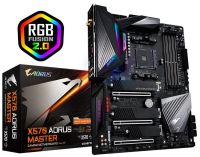
GA-X570-AORUS-MASTER Gigabyte X570-Aorus Master AMD X570 Chipset Socket Ryzen AM4 Motherboard
Images are for illustrative purposes and actual product may differ.
GA-X570-AORUS-MASTER Motherboards: AMD Socket AM4 MotherboardGigabyte
GA-X570-AORUS-MASTER information and overview
Gigabyte X570-Aorus Master - AMD X570 Chipset: Socket AM4, Supports AMD 3rd Gen Ryzen/ 2nd Gen Ryzen/ 2nd Gen Ryzen with Radeon Vega Graphics/ Ryzen with Radeon Vega Graphics Processors, Memory: 4x Dual Channel DDR4 DIMM Slots (128GB Max / 4400MHz Supported), Expansion Slots: 1x PCI-Express 4.0 (x16 Speed), 1x PCI-Express 4.0 (x8 Speed), 1x PCI-Express 4.0 (4x Speed), 1x PCI-Express 4.0 (x1 Speed) Storage and USB: 6x SATA 3 (6 Gb/s), 4x M.2 Connector (Socket 3, M Key, 3x PCIe 4.0 only), Supports RAID 0,1,10, 9x USB 3.2 Ports (5x Back, 4x Cable), 8x USB 2.0 Ports (8x Back, 4x Cable), 2x USB-Type-C, Misc.: 7.1 Channel High Definition Audio, Supports S/PDIF Out, 1x Intel GBE Lan (10 / 100 / 1000), 1x Realtek GBE LAN (10/100/1000), Wi-Fi 802.11 a/b/g/n/ac, supporting 2.4/5 GHz Dual-Band, BLUETOOTH 5.0, Rear IO Panel Display Ports Available: NONE
Not for sale. This is a discontinued product.
Kindly search for an alternative on our site
Subject to correction, the product was first added on 2019-07-11 and the last date we have for this product is 2024-10-04, where the last unit was sold for R 7020, which may have been a final clearance price.
Specifications & more information about GA-X570-AORUS-MASTER, Motherboards: AMD Socket AM4 Motherboard manufactured by Gigabyte
Product information notice: Some specifications may describe a broader product range and may not apply to this exact model. Use the product summary above as the primary model reference. Bundled software may be trial software and can require a separate licence.
Features:
Dominant in Darkness
In the dark, starless night, the falcon strikes fear into the heart of its prey. Even with minimal visibility, the falcon pinpoints its prey and patiently anticipates the perfect moment to swoop in for the kill. The falcon with its laser sharp gaze dominates the darkness of night in the same manner that AORUS Core Lighting illuminates the vast AORUS ecosystem.
GET READY FOR AMD RYZEN™ 3000-SERIES
GIGABYTE X570 motherboards based on the AMD X570 Chipset provide full support for 3rd Gen AMD Ryzen™ Processors. The all-new design is a testament to GIGABYTE's dedication to design quality. GIGABYTE X570 motherboards offer a rich list of features such as support for PCIe 4.0 and USB Type-C™ interfaces on select boards, refined audio, high speed of Ethernet and latest standard of WIFI design, to fulfill users' performance, audio, and data transfer needs. The new, advanced power and thermal design enables users to unleash the performance on AMD Ryzen™ 3000-series Processors, making the GIGABYTE X570 motherboards perfect for users looking to build the best AMD platform gaming system.
AMD StoreMI Technology
GIGABYTE X570 motherboards maximize your PC's potential with AMD StoreMI technology. StoreMI accelerates traditional storage devices to reduce boot times and enhance the overall user experience. This easy-to-use utility combines the speed of SSDs with the high capacity of HDDs into a single drive, enhances the read/write speeds of the device to match that of SSDs, bolsters data performance for incredible value, and transforms the everyday PC to a performance driven system.
The benefits of AMD StoreMI: - Making the PC experience fast, smooth and easy
- Optimizing computer responsiveness from system boot to application launch
- Offering SSD performance with HDD capacity at an affordable cost
- Quickly accessing key files by automatically learning users' computing behaviors
Ultimate Power Design
To unleash the full potential of the 3rd Generation of AMD Ryzen™ CPU, the motherboard requires the best CPU power design. With the best quality components and GIGABYTE R&D design capability, the X570 AORUS is a true beast among motherboards.
Direct 14 Phases Infineon Digital Power Design
X570 AORUS MASTER motherboard uses the latest new generation Infineon multiphase PWM controller, and a total of 14 phases for vCore and SOC, all with IR 3556 PowIRstage MOSFETs which are capable of providing at least 50A of power from each phase, for a total of 700A. Additional 8+8 Solid-pin CPU Power Connectors offer incredible precision in delivering power to the motherboard's most power-hungry and energy-sensitive components, allowing enthusiasts to get the absolute maximum performance from new AMD Ryzen 3000 series processors.
2X Copper PCB
GIGABYTE's exclusive 2X copper PCIe 4.0 Ready PCBs design provides sufficient power trace paths between components to handle greater than normal power loads and to remove heat from the critical CPU power delivery area. This is essential to ensure the motherboard is able to handle the increased power loading that is necessary when overclocking.
Advanced Thermal Design
X570 AORUS MASTER reaches a perfect balance between style and performance by combining the media acclaimed Fins-Array heatsink, a heatpipe, and a thermal baseplate, to provide 30% lower MOSFET temperatures for enthusiasts, overclockers and professional gamers.
Fins-Array Heatsink with Direct Touch Heatpipe and High Thermal Conductivity Pad
X570 AORUS MASTER uses Fins-Array Heatsink which increases the heat dissipation area by 300% compared to traditional heatsinks of the same size. Direct Touch Heatpipe helps transfer heat from MOS fins. By using LAIRD 1.5mm thick, 5W/mK high thermal conductivity pads, it can transfer 2.7x more heat compared to traditional thermal pads in the same time period.
Durable design and easy installation - With an integrated base plate, GIGABYTE Motherboards give users a strong foundation to build their Gaming PCs.
- With an integrated I/O shield, building a GIGABYTE Ultra Durable PC is even easier.
- Integrated Q-Flash Plus/ Clear CMOS buttons on the I/O shield enable users easier debugging and operation.
Full PCIe 4.0 Design
X570 AORUS pushes the envelope once again by featuring Full PCIe 4.0 Design, including PCIe 4.0 slots, PCIe 4.0 M.2 connectors, PCIe 4.0 B-clock Tuning IC, and delivering highly optimized performance and flexibility demanded for power users and extreme gaming enthusiasts. The inclusion of the PCIe 4.0 B-Clock Tuning IC and a server grade PCB helps you unlock the best performance from PC peripherals.
PCIe 4.0 Hardware
X570 AORUS Series Motherboards feature built-in PCIe 4.0 slots, delivering superior bandwidth compared to that from previous generation technology. Performance of Graphics cards and PCIe NVMe AIC SSDs will not be limited by insufficient bandwidth. PCIe 4.0 slots have higher slot signal stability and lower impedance, maximizing PCIe bandwidth while also being backwards compatible with PCIe 3.0.
Triple PCIe 4.0 M.2 Connectors with Thermal Guards
AORUS Gaming Motherboards are focused on delivering M.2 technology to enthusiasts who want to maximize their systems’ potential.
Extreme Performance with PCIe 4.0 x4 NVMe PCIe SSDs
X570 AORUS motherboards offer the industry’s best compatibility in terms of NVMe storage for users who demand high capacity and seek the best performance. AORUS' unique design can be configured in RAID for record speeds of up to 9840 MB/s (Sequential Read), making AORUS the obvious choice for the ultimate PC.
GIGABYTE Ultra-Efficient M.2 Thermal Guard
For upcoming ultra fast PCIe 4.0 SSDs, compromised performance is not acceptable. Well-managed thermal performance is particularly important for high-performance Gen 4 NVMe SSDs. GIGABYTE provides improved thermal solutions for M.2 SSD devices. The M.2 Thermal Guard prevents throttling and bottlenecks on high speed M.2 SSDs as it helps to dissipate heat before it becomes an issue.
Support for DDR4 XMP Up to 4400MHz and Beyond*
AORUS is offering a tested and proven platform that ensures proper compatibility with profiles up to 4400MHz and beyond. All users need to do to attain this performance boost is to ensure that their memory module is XMP capable and that the XMP function is activated and enabled on their AORUS motherboard.
PCIe 4.0 Turbo B-Clock Tuning IC
The PCIe 4.0 Turbo B-Clock Tuning IC on X570 AORUS motherboards enables overclockers to change their BCLK frequencies to their desired values. With the new linear range adjustment option of the Tuning IC, ranges from 100MHz to 300MHz are now possible.
ESS SABRE reference DAC ES9118 - ESS SABRE reference DAC (ESS 9118)
- Hypertream Dynamic Range (SNR 125dB)
- High-Res music (32bit, 192KHz PCM)
- Super low THD+N (THD+N -112db)
True High-Fidelity Music (Realtek ALC1220-VB)
Paired with Realtek's latest ALC1220 Codec, playback for surround sound audio and DSD enabled music are easier than ever.
Audiophile Grade Capacitors (WIMA , Nichicon Fine Gold)
To ensure a studio-quality experience, WIMA and Nichicon Fine Gold capacitors are used to provide power to the overall system.
Precision Audio Stream (TXC OSCILLATOR)
Provides precise time triggers to Digital-Analog Converters. High resistance to corrosion and oxidation.
All New Realtek High-End HD Audio Codec
ALC1220 120dB(A) SNR HD Audio with Smart Headphone Amp automatically detects impedance of your head-worn audio device, preventing issues such as low volume and distortion. With the new VB series audio controller, stream your voice to the world vibrantly with both front/rear microphone SNR up to 110/114dB(A).
No More Confusion During In-Game Voice Chat
Microphone input with higher front dynamic range allows gamers to hear more clearly. No more misunderstandings, no more confusing GO! GO! GO! as NO! NO! NO!
Next Generation Connectivity
A high-end product needs to be future-proof so your system stays up-to-date with the latest technology. X570 AORUS motherboards provide all next generation network, storage, and WIFI connectivity to keep you up to speed.
New Introduce Intel® WiFi 6 802.11ax + BT 5 Module
Intel Wireless solution supports 802.11ax, enables gigabit wireless performance, provides smooth video streaming, better gaming experience, few dropped connections and speeds up to 2.4Gbps*. Moreover, Bluetooth 5 provides 4X range over BT 4.2 and with faster transmission.
Benefit of WiFi 6: - 5.5X throughput than 802.11ac 1x1*
- 4X better network capacity, no traffic jams especially in those dense area with lots of devices
- Network efficiency increase for better user experience
AORUS Antenna Supports Dual Band with Better WIFI Signal
All new antenna supported dual band 802.11ax/ac 2.4GHz & 5GHz.
better signal strength compared to traditional antenna design
AORUS Antenna with smart antenna function for the best WIFI signal transmitting
Multiple angle tilt and magnetic base for the best signal strength direction and location
2X Faster than ever - Adoption of 2.5G LAN provide up to 2.5 GbE network connectivity, with at least 2 times faster transfer speeds compared to general 1GbE networking, perfectly designed for gamers with ultimate online gaming experience
- Support Multi-Gig(10/100/1000/2500Mbps) RJ-45 ethernet
Intel® GbE LAN with cFosSpeed Internet Accelerator Networking
Intel® GbE LAN features cFosSpeed, a network traffic management application which helps to improve network latency and maintain low ping times to deliver better responsiveness in crowded LAN environments.
USB TurboCharger
GIGABYTE patent pending USB TurboCharger technology allows users to recharge their mobile devices with stunning speed, up to 50% in less than 30 minutes*. By connecting Front USB 3.2 Gen1 Type-A cable of chassis to our motherboard, USB TurboCharger can recharge both Android devices with QC 3.0 and Apple devices with Apple Fast-Charge function.
USB Type-C™ Front Panel Connector
Equipped with next generation connectivity AORUS Gaming Motherboards already support the chassis of the future. The onboard USB Type-C™ header for USB 3.2 Gen2 makes access convenient when connecting a USB 3.2 Gen2 drive or charging your new mobile device.
Connecting the Future - USB Type-C™
AMD's native USB 3.2 Gen2 provides USB 3.2 Gen2 ports with speeds up to 10Gbps. With twice the bandwidth compared to its previous generation as well as backwards compatibility with USB 2.0 and USB 3.2 Gen1, the much improved USB 3.2 Gen2 protocol is available over the new reversible USB Type-C™ and the traditional USB Type-A connector for better compatibility over a wider range of devices.
RGB Fusion 2.0
With AORUS Motherboards, RGB Fusion 2.0 is even better with Addressable LEDs.* RGB Fusion 2.0 offers users the option to control onboard RGB and external RGB / Addressable LED light strips for their PC. Already feature filled with colors and patterns, RGB Fusion 2.0 on X570 Series AORUS Motherboards are now upgraded with Addressable LED support. With external Addressable LED strips*, where each LED is digitally addressable, users can experience even more patterns, styles, and illuminations. AORUS Motherboards will support 5v Addressable LED lighting strips and up to 300 LED lights. RGB Fusion 2.0 with Addressable LEDs comes with new patterns and various speed settings with more to come.
Multi-Zone Light Show Design
Now offering more LED customizations than ever, users can truly adapt their PC to represent their lifestyle. With full RGB support and a redesigned RGB Fusion 2.0 application, the user has complete control over the LEDs which surround the motherboard.
RGB Fusion 2.0 Ready
With a dazzling array of products supported, RGB Fusion 2.0 is the software that brings it all together, letting your accessories synchronize to the same beat. Customize all your LEDs how you like — have them match, dazzle and impress.
RGB Fusion 2.0 Software
With an integrated intuitive user interface, the RGB Fusion 2.0 provides you a better solution for customizing the lighting effects across all supported devices. From motherboards, graphics cards to the peripheral products, you can personalize your gaming rig with your own style and show off your build by sharing the profiles. In addition, the new gaming mode makes the lighting effects interactive with selected games to bring you the most immersive gaming experience.
GIGABYTE RGB Fusion APP
Don't just make your PC shine, make it a work of art that friends will envy. With the GIGABYTE RGB Fusion mobile app users can watch as they control the lighting within their gaming PC. This gives users ease of access as they try and adjust colors and speeds for different modes, all this can be achieved away from the keyboard and monitor of their PC.
Smart Fan 5
With Smart Fan 5 users can ensure that their gaming PC can maintain its performance while staying cool. Smart Fan 5 allows users to interchange their fan headers to reflect different thermal sensors at different locations on the motherboard. Not only that, with Smart Fan 5 more hybrid fan headers that support both PWM and Voltage mode fans have been introduced to make the motherboard more liquid cooling friendly.
Fan Stop
Achieve fan silence. With Fan Stop, map any fan to stop completely when temperatures drop below a specified threshold. Which fan stops, based on readings from which sensor, and at what temperature—all of it can be customized to your liking.
Hybrid Fan Pin Headers
Assume complete control over your liquid cooling setup! Smart Fan 5 receives up-to-the-second information on flow-rate and water-temperature through the Hybrid Fan Pin Headers or external thermistor sensors—giving you absolute mastery over your PC. All Hybrid Fan Headers can automatically detect the type of cooling device whether it be fan or pump with different PWM or Voltage mode.
Noise Detection
With the new Noise Detection function, you can monitor noise level of all devices including fans, CPU coolers, graphics card, etc. in real time, and you can determine how fast your fan speed needs to be. Our bundled Noise Detection cable doesn’t include any sound recording function, it simply detects sound pressure while protecting your privacy.
New Smart Fan 5 Software
Choose from different modes, Quiet to Full Speed, to match your system usage preferences. For each fan or pump, you can use the intuitive fan curve to define trigger thresholds and corresponding fan speeds.
Q-Flash Plus
With GIGABYTE Q-Flash Plus, you don’t need to install the CPU, memory and graphics card nor enter the BIOS menu to flash the BIOS. Just download and save a new BIOS file (rename to gigabyte.bin) on the USB flash drive, then press the dedicated Q-Flash Plus button and you’re good to go!
Solid Pin Power Connectors
X570 AORUS motherboards feature solid plated ATX 24pin & ATX 12V 8pin + 8pin power connectors to offer a stable power supply during CPU overloading.
Solid Pin Power connector advantages - Larger contact area for electricity
- More metal quantity to sustain higher power and generated heat
- Ultra durable and longer lifespan
Industry Leading Ultra Durable™ PCIe Armor
The innovative one piece stainless steel shielding design from GIGABYTE reinforces the PCIe connectors to provide the extra strength required to support heavy graphics cards.
Ultra Durable™ Memory Armor
AORUS' exclusive one piece stainless steel shielding design prevents against PCB distortion/twisting and plate bending, in addition to preventing any possible ESD interference
Hardware Troubleshooting at a Glance
Onboard LEDs controlled by the system BIOS indicate if a malfunction is occurring, allowing users to quickly diagnose which major component (CPU/DDR/VGA/HDD) is malfunctioning so they may take action promptly.
GIGABYTE Patented DualBIOS™ Design
GIGABYTE Ultra Durable™ motherboards feature GIGABYTE DualBIOS™, an exclusive technology from GIGABYTE that protects arguably one of your PC's most crucial components, the BIOS. GIGABYTE DualBIOS™ means that your motherboard has both a 'Main BIOS' and a 'Backup BIOS', protecting users from BIOS failure due to virus, hardware malfunction, improper OC settings or power failure during the update process.
Easy to Install "G Connector" Design
The tiny cables of the front panel connectors can be hard to manipulate as space is restricted and indicators are tiny. With the G Connector, you can connect all the FP cables at once, simplifying the process of building your next PC and saving you frustration.
New User Interface
All new EASY MODE shows important hardware information in one page including CPU clock, Memory, Storage, Fan.
My Favorites
Add constantly used items into the favorite menu for quick access.
Storage Information
Show all kinds of storage information including SATA, PCIE and M.2 interface.
Changelog
List all changes before saving and exiting bios. Quickly review overall settings modification.
Optimized Memory Installation Reminder
Displays correct installation reminder message when user installs two memory modules but runs single channel mode.
Intuitive Load Line Curve
Clearly show each loadline calibration setting in an intuitive curve graph.
APP CENTER
GIGABYTE APP CENTER is an useful portal of all GIGABYTE MB utilities and drivers, you can choose any utility you want to install from APP CENTER and keep you updated with latest utilities and drivers version.
EasyTune™
GIGABYTE's EasyTune™ is a simple and easy-to-use interface that allows users to fine-tune their system settings or adjust system and memory clocks and voltages in a Windows environment. With Smart Quick Boost, one click is all it takes to automatically overclock your system, giving an added performance boost when you need it the most.
@BIOS
The GIGABYTE @BIOS app allows you to update your system’s BIOS from within Windows using a simple and slick graphical user interface. @BIOS can automatically download the latest version from the GIGABYTE servers or you can update your BIOS from a file on your computer. @BIOS also allows you to save your current BIOS to a file, recover your previous BIOS from an image and backup your BIOS to an image.
System Information Viewer
GIGABYTE System Information Viewer is a central location that gives you access to your current system status. Monitor components such as the clocks and processor, set your preferred fan speed profile, create alerts when temperatures get too high or record your system's behavior; these are the possibilities of the System Information Viewer.
XSplit Gamecaster + Broadcaster: Cast Your Game Anytime, Anywhere
Now set up your stage and share the greatest gaming moments with XSplit Gamecaster + Broadcaster! Fully optimized social media integration is ready for real-time chats—keeping you notified yet focused in the game. It takes just one click to stream your gameplay to Twitch. Host your game like a pro! Specifications: | ©2026 Respective owners and brand holders. This table has been carefully researched and generated by ComXpert International CC (//www.comx-computers.co.za), however, errors and omissions may occur. Only references to South Africa apply. All products are sourced in South Africa from the official suppliers and the warranty is that of the local supplier. E&OE. This table and our site's content may be used on condition that this notice and link remains intact and unaltered. | Specifications | | Product Code | GA-X570-AORUS-MASTER | | CPU | 1. AMD Socket AM4, support for: 3rd Generation AMD Ryzen processors/ 2nd Generation AMD Ryzen processors/ 2nd Generation AMD Ryzen with Radeon Vega Graphics processors/ AMD Ryzen with Radeon Vega Graphics processors | | Chipset | 1. AMD X570 | | Memory | 1. 3rd Generation AMD Ryzen processors: | | Support for DDR4 4400(O.C.) / 4300(O.C.) / 4266(O.C.) / 4133(O.C.) / 4000(O.C.) / 3866(O.C.) / 3800(O.C.) / 3733(O.C.) / 3600(O.C.) / 3466(O.C.) / 3400(O.C.) / 3333(O.C.) / 3300(O.C.) / 3200 / 2933 / 2667 / 2400 / 2133 MHz memory modules | | 2. 2nd Generation AMD Ryzen processors/2nd Generation AMD Ryzen with Radeon Vega Graphics processors/AMD Ryzen with Radeon Vega Graphics processors: | | Support for DDR4 3600(O.C.) / 3400(O.C.) / 3333(O.C.) / 3200(O.C.) / 2933 / 2667 / 2400 / 2133 MHz memory modules | | 3. 4 x DDR4 DIMM sockets supporting up to 128 GB (32 GB single DIMM capacity) of system memory | | 4. Dual channel memory architecture | | 5. Support for ECC Un-buffered DIMM 1Rx8/2Rx8 memory modules | | 6. Support for non-ECC Un-buffered DIMM 1Rx8/2Rx8/1Rx16 memory modules | | 7. Support for Extreme Memory Profile (XMP) memory modules | | Audio | 1. Realtek<sup> </sup> ALC1220-VB codec | | * The front panel line out jack supports DSD audio. | | 2. ESS SABRE9118 DAC chip | | 3. High Definition Audio | | 4. 2/4/5.1/7.1-channel | | 5. Support for S/PDIF Out | | LAN | 1. 1 x Intel<sup> </sup> GbE LAN chip (10/100/1000 Mbit) (LAN1) | | 2. 1 x Realtek<sup> </sup> 2.5GbE LAN chip (10/100/1000/2500 Mbit) (LAN2) | | Wireless Communication module | 1. Wi-Fi 802.11a/b/g/n/ac/ax, supporting 2.4/5 GHz Dual-Band | | 2. BLUETOOTH 5.0 | | 3. Support for 11ax 160MHz wireless standard and up to 2.4 Gbps data rate | | * Actual data rate may vary depending on environment and equipment. | | Expansion Slots | Integrated in the CPU (PCIEX16/PCIEX8): | | 1. 3rd Generation AMD Ryzen processors: | | 1 x PCI Express x16 slot, supporting PCIe 4.0 and running at x16 (PCIEX16) | | 1 x PCI Express x16 slot, supporting PCIe 4.0 and running at x8 (PCIEX8) | | 2. 2nd Generation AMD Ryzen processors: | | 1 x PCI Express x16 slot, supporting PCIe 3.0 and running at x16 (PCIEX16) | | 1 x PCI Express x16 slot, supporting PCIe 3.0 and running at x8 (PCIEX8) | | * For optimum performance, if only one PCI Express graphics card is to be installed, be sure to install it in the PCIEX16 slot. | | * The PCIEX8 slot shares bandwidth with the PCIEX16 slot. When using the 3rd Generation AMD Ryzen processors/2nd Generation AMD Ryzen processors, the PCIEX16 slot operates at up to x8 mode. | | 3. 2nd Generation AMD Ryzen with Radeon Vega Graphics processors/AMD Ryzen with Radeon Vega Graphics processors: | | 1 x PCI Express x16 slot, supporting PCIe 3.0 and running at x8 (PCIEX16) | | Integrated in the Chipset (PCIEX4/PCIEX1): | | 1. 1 x PCI Express x16 slot, supporting PCIe 4.0*/3.0 and running at x4 (PCIEX4) | | * For 3rd Generation AMD Ryzen processors only. | | 2. 1 x PCI Express x1 slot, supporting PCIe 4.0*/3.0 | | * For 3rd Generation AMD Ryzen processors only. | | Multi-Graphics Technology | 1. Support for NVIDIA<sup> </sup> Quad-GPU SLI and 2-Way NVIDIA<sup> </sup> SLI technologies | | Support for AMD Quad-GPU CrossFire and 2-Way AMD CrossFire technologies | | For 3rd Generation AMD Ryzen processors/2nd Generation AMD Ryzen processors only. | | Storage Interface | Integrated in the CPU (M2A_SOCKET): | | 1. 3rd Generation AMD Ryzen processors: | | 1 x M.2 connector (Socket 3, M key, type 2242/2260/2280/22110 SATA and PCIe 4.0 x4/x2 SSD support) | | 2. 2nd Generation AMD Ryzen processors/2nd Generation AMD Ryzen with Radeon Vega Graphics processors/AMD Ryzen with Radeon Vega Graphics processors: | | 1 x M.2 connector (Socket 3, M key, type 2242/2260/2280/22110 SATA and PCIe 3.0 x4/x2 SSD support) | | Integrated in the Chipset (M2B_SOCKET/M2C_SOCKET): | | 1. 1 x M.2 connector (Socket 3, M key, type 2242/2260/2280/22110 SATA and PCIe 4.0*/3.0 x4/x2 SSD support) (M2B_SOCKET) | | * For 3rd Generation AMD Ryzen processors only. | | 2. 1 x M.2 connector (Socket 3, M key, type 2242/2260/2280 SATA and PCIe 4.0*/3.0 x4/x2 SSD support) (M2C_SOCKET) | | * For 3rd Generation AMD Ryzen processors only. | | 3. 6 x SATA 6Gb/s connectors | | 4. Support for RAID 0, RAID 1, and RAID 10 | | * Refer to "1-9 Internal Connectors, " for the installation notices for the M.2 and SATA connectors. | | USB | Integrated in the CPU: | | 1. 2 x USB 3.2 Gen 2*/Gen 1 Type-A ports (red) on the back panel | | * For 3rd Generation AMD Ryzen processors only. | | 2. 2 x USB 3.2 Gen 1 ports on the back panel | | Integrated in the Chipset: | | 1. 1 x USB Type-C port with USB 3.2 Gen 2 support, available through the internal USB header | | 2. 1 x USB Type-C port on the back panel, with USB 3.2 Gen 2 support | | 3. 1 x USB 3.2 Gen 2 Type-A port (red) on the back panel | | 4. 4 x USB 3.2 Gen 1 ports available through the internal USB headers | | Chipset+USB 2.0 Hub: | | 1. 8 x USB 2.0/1.1 ports (4 ports on the back panel, 4 ports available through the internal USB headers) | | Internal I/O Connectors | 1. 1 x 24-pin ATX main power connector | | 2. 2 x 8-pin ATX 12V power connectors | | 3. 1 x CPU fan header | | 4. 1 x water cooling CPU fan header | | 5. 3 x system fan headers | | 6. 2 x system fan/water cooling pump headers | | 7. 2 x addressable LED strip headers | | 8. 2 x RGB LED strip headers | | 9. 3 x M.2 Socket 3 connectors | | 10. 6 x SATA 6Gb/s connectors | | 11. 1 x front panel header | | 12. 1 x front panel audio header | | 13. 1 x USB Type-C port, with USB 3.2 Gen 2 support | | 14. 2 x USB 3.2 Gen 1 headers | | 15. 2 x USB 2.0/1.1 headers | | 16. 1 x noise detection header | | 17. 1 x Trusted Platform Module (TPM) header (2x6 pin, for the GC-TPM2.0_S module only) | | 18. 2 x temperature sensor headers | | 19. 1 x power button | | 20. 1 x reset button | | 21. 2 x BIOS switches | | 22. 1 x Clear CMOS jumper | | 23. Voltage Measurement Points | | Back Panel Connectors | 1. 1 x Q-Flash Plus button | | 2. 1 x Clear CMOS button | | 3. 2 x SMA antenna connectors (2T2R) | | 4. 1 x USB Type-C port, with USB 3.2 Gen 2 support | | 5. 2 x USB 3.2 Gen 2*/Gen 1 Type-A ports (red) | | * For 3rd Generation AMD Ryzen processors only. | | 6. 1 x USB 3.2 Gen 2 Type-A port (red) | | 7. 2 x USB 3.2 Gen 1 ports | | 8. 4 x USB 2.0/1.1 ports | | 9. 2 x RJ-45 ports | | 10. 1 x optical S/PDIF Out connector | | 11. 5 x audio jacks | | I/O Controller | 1. iTE<sup> </sup> I/O Controller Chip | | H/W Monitoring | 1. Voltage detection | | 2. Temperature detection | | 3. Fan speed detection | | 4. Water cooling flow rate detection | | 5. Overheating warning | | 6. Fan fail warning | | 7. Fan speed control | | * Whether the fan (pump) speed control function is supported will depend on the fan (pump) you install. | | 8. Noise detection | | BIOS | 1. 2 x 128 Mbit flash | | 2. Use of licensed AMI UEFI BIOS | | 3. Support for DualBIOS | | 4. PnP 1.0a, DMI 2.7, WfM 2.0, SM BIOS 2.7, ACPI 5.0 | | Unique Features | 1. Support for APP Center | | * Available applications in APP Center may vary by motherboard model. Supported functions of each application may also vary depending on motherboard specifications. | | @BIOS | | AutoGreen | | Cloud Station | | EasyTune | | Fast Boot | | Game Boost | | RGB Fusion | | Smart Backup | | Smart Keyboard | | Smart Survey | | System Information Viewer | | USB Blocker | | USB TurboCharger | | 2. Support for Q-Flash Plus | | 3. Support for Q-Flash | | 4. Support for Xpress Install | | Bundled Software | 1. Norton<sup> </sup> Internet Security (OEM version) | | 2. cFosSpeed | | 3. XSplit Gamecaster + Broadcaster (12 months license) | | Operating System | 1. Support for Windows 10 64-bit | | Form Factor | 1. ATX Form Factor; 30.5cm x 24.4cm |
Similar Motherboards: AMD Socket AM4 Motherboard

The best price and guaranteed service and backup from official computer suppliers in South Africa for the GA-X570-AORUS-MASTER Gigabyte X570-Aorus Master AMD X570 Chipset Socket Ryzen AM4 Motherboard. Available from this online computer store delivering door-to-door in Johannesburg, Cape Town, Port Elizabeth, Pretoria, Pietermaritzburg, Polokwane, Durban and all over South Africa. Find related GA-X570-AORUS-MASTER Gigabyte X570-Aorus Master AMD X570 Chipset Socket Ryzen AM4 Motherboard products in our Motherboards: AMD Socket AM4 Motherboard Category for even more options. Read reviews and find out about GA-X570-AORUS-MASTER Gigabyte X570-Aorus Master AMD X570 Chipset Socket Ryzen AM4 Motherboard. Discounts, specials and cheap prices only at ComX Computers.
| |





 Up
 Down


 Mobile store